
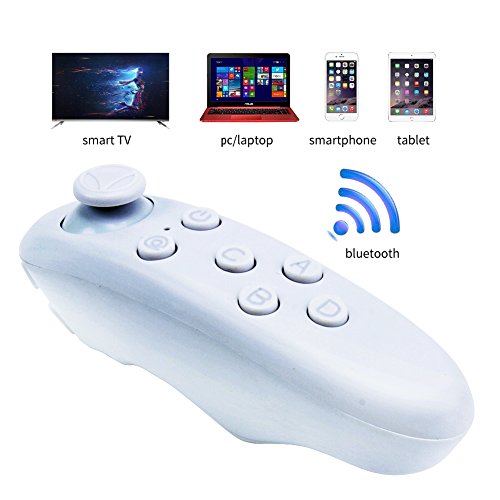
ATETION 3D VR Virtual Reality Headset,vr box,VR glasses,3D Video Movie Glasses For 3.5~6.0" Smartphones iPhone 6 iPhone6 plus Samsung Galaxy IOS Android Cellphones(Bluetooth remote control)

Product Description
ATETION 3D VR Virtual Reality Headset,vr box,VR glasses,3D Video Movie Glasses For 3.5~6.0" Smartphones iPhone 6 iPhone6 plus Samsung Galaxy IOS Android Cellphones(Bluetooth remote control)
- Bluetooth Gamepad is a portable wireless controller multifunction joystick for VR-BOX or smartphone 3D games. Perfectly compatible for iOS, Android, PC
- Very new design, feel comfortable with iOS, Android 4.0 and above, PC system
- Portable wireless bluetooth remote controller support shutter without mouse wire gamepad, pc remote controller, TV controller box. You can play music or read a e-book with the remote controller
- 4 modes for A: Music&Video, B: Games, C:VR, Video, Selfie, D: Selfie, Mouse
Bluetooth mobile phone remote control for most Android, IOS and Tablet PC systems.
Gathered photographs, Game Consoles, regulation volume, play music, 3D video and integration.
Mini design, super feeling, let you put it down.
Technical Parameters
Model: VR-BOX RK remote control
Product size: 130 * 33 * 44mm
Product Weight: 56g
Material: PC + ABS environmental protection material
Use range: 10m
Wireless Protocol: Bluehooth3.0compiant
Support System: Android Andrews / ISO Apple / PC
Support Games: Android / PC (GAMEPAD): NES / GB / SMD /
PSX / GBC / N64 / MAME; AndroidAPK game Apple / ISO: Icade Games
CPU: ARM968E-S Coer
Battery: R03 7 1.5-volt batteries 2
Current job: 0.5-8mA
Standby current: 0.5-1mA
Shutdown Current: 0
With 3 Modes:
Mode 1: Android mode, blue light, mouse / selfie shutter / gamepad function
Mode 2: Android mode, blue light, music / selfie shutter / gamepad function
Mode 3: IOS mode, blue light, music / selfie shutter / gamepad function
Play VR game on remote control
Note: 1 The game must support remote operation
2 iPhone need to set the keyboard, Settings-General-keyboard-keyboards-the English
keyboard to move to the first line. (IPhone can not find the reason to play VR games)
3 Press @ + B to open the game to operate
Move: Use the Bluetooth remote control stick to control walking, VR glasses represent the direction of movement
Shooting: Click A
Switch Bullet: Click B
Package Contents:
1 x Bluetooth Remote Controller
1 x instructions
Technical Specifications
You might also like
SARLAR 3D VR Glasses, virtual reality headset Movie Game For IOS, Android, Microsoft& PC phones Series within 4 - 6.5 Inch

Electronix Express 78HXYZ4VR$$ 3D VR Headset with Stereo Headphone, black
VR Headset, ELEGIANT 3D VR Glasses, Virtual Reality Headset for 3D Movies and Video Games, Compatible with iPhone 7 / 7 Plus 6 / 6s /6 Plus Samsung S7 S6 Edge S5 Note 5 and Other 4.0"-6.0" Smartphones

iPhone 7 Plus Case, Dostyle Shock Absorption Bumper Soft TPU Anti-Scratch Cover Case for iPhone 7 Plus 5.5 Inch (Clear)

3D VR Box (88203A), Virtual Reality Glasses Headset for iPhone7/6s/6 plus Samsung Galaxy s6 Edge+ and Other 3.5"-6.0" IOS Android Smart Phones, Rose Gold

3D VR Glasses Headset Google Cardboard 120° degree Viewing Immersive Virtual Reality 3D Movies Video Games, Games Glasses VR Headset

iDudu VR - Virtual Reality Headset with Stereo Headphone for iPhone & Android Smartphones
Precision Screwdriver set,HokoAcc Hand Tools Magnetic Drive Kit, 58 in 1 with 54 Bit Smart Phone Repair Tool with Orange Box
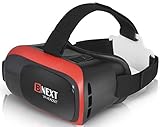
3D VR Headset Virtual Reality Glasses for iPhone & Android - Play Your Best Mobile Games & 360 Movies With Soft & Comfortable New Goggles Plus Special Adjustable Eye Care System