

Upgrow Lightning to RJ45 Ethernet Adapter LAN Wired Network Adapter for iPhone and iPad Support iOS 10.01-11.2.7, Plug and Play High Speed Ethernet Connector (Aluminum Silver)
Product Description
Upgrow Lightning to RJ45 Ethernet Adapter LAN Wired Network Adapter for iPhone and iPad Support iOS 10.01-11.2.7, Plug and Play High Speed Ethernet Connector (Aluminum Silver)
- Lightning to RJ45 Ethernet LAN Wired Network Adapter for iPhone and iPad
- Plug and Play--Easy installation,Just Activates by Simply Connecting it to an available iPhone/iPad and LAN network
- Adapter size:W58×D23×H16mm, Lightning Cable:1M/3.3Ft, Weight:26.4g,High Speed10Mbps/100Mbp
- System Version--iOS 10.x(iOS 10.0.1- iOS 10.3.3)+ iOS 11 x(11.0.1-11.2.7),like iPad Pro, iPad Air 2, iPad Air, iPad,iPad mini4,iPad mini 3, iPad mini2, iPod,iPhoneX/ iPhone8/iPhone8 Plus/iPhone7/ iPhone7 Plus/6s/6sPlus/6/ 6Plus/SE/5s
- Package--1x lightning to RJ45 Adapter with 60 Days Quality Warranty
Upgrow Lightning to RJ45 Ethernet LAN Wired Network Adapter for iPhone and iPad
Plug and Play: Easy installation, activated by simply connecting it to an available iPhone/iPad with LAN network.
Powered: No external power needed,no charging function with this version.
High Speed: Supports 10/100Mbps lightning cable directly
System Version:iOS 10.x(iOS 10.0.1- iOS 10.3.3)+ iOS 11 x(11.0.1-11.2.7)
Compatibility:
iPad Pro,iPad Air 2,iPad Air,iPad mini4/3/2,iPhoneX/ iPhone8/iPhone8 Plus/iPhone7/ iPhone7 Plus/6s/6sPlus/6/ 6Plus/SE/5s
How to use the lightning Ethernet Adapter?Let's check out the instruction
1.Turn off your iPhone "WLAN" off, or turn your iPhone on "Airplane mode".
2.Insert your router-connected Ethernet cable into Ethernet port of our adapter, and connect the lightning
end into your iPad or iPhone, Make sure your LAN cable is connected to the internet.
(Our Adapter can't dial-up internet itself, need your router device provide an IP by DHCP service.)
3.Go to"Setting" on your iPad or iPhone and an Ethernet setting will be found on your screen.
4.Click the Ethernet to obtain an IP address.
5.Connect the adapter to your iPhone and open the "Safari" of your iPhone, to check whether the internet is connected or not.
Package List
1* RJ45 Lightning to Ethernet Adapter
Warranty:
1. Unconditional 90-Days Refund or Replacement
2. Any Problem, please contact us first ,we will provide satisfactory solution to you
Technical Specifications
You might also like
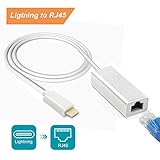
RayCue Lightning to RJ45 Ethernet LAN Network Adapter for iPhone/iPad, iPhone Ethernet Adapter, 3.3ft/1m Cable, 10/100Mbps High Speed, System Required iOS 10.0 or Up

URANMOLE Wood Round Pub Bar Tables Cocktail Tables Pedestal Tables - Kitchen Dining Room Bistro Coffee Garden Living Room Tables - Wood Top Black Metal Leg and Base (Bar tables)
UGREEN Network Adapter USB 3.0 to Ethernet RJ45 Lan Gigabit Adapter for 10/100/1000 Mbps Ethernet Supports Nintendo Switch Black

Apple Thunderbolt Gigabit Ethernet Adapter (MD463LL/A)
Anker USB 3.0 Unibody Portable Aluminum Gigabit Ethernet Adapter Supporting 10/100/1000 Mbps Ethernet for Macbook, Mac Pro/mini, iMac, XPS, Surface Pro, Notebook PC and More

ivanky Thunderbolt to HDMI Adapter [2-Pack, Super Slim, Nylon Braided] Mini DisplayPort to HDMI Adapter for Microsoft Surface Pro/Dock, Apple MacBook Air/Pro, Monitor, Projector and More -Space Grey
Apple USB Ethernet Adapter (MC704LL/A)

Lighting Science GoodNight Sleep Promoting LED Night Light Bulb