
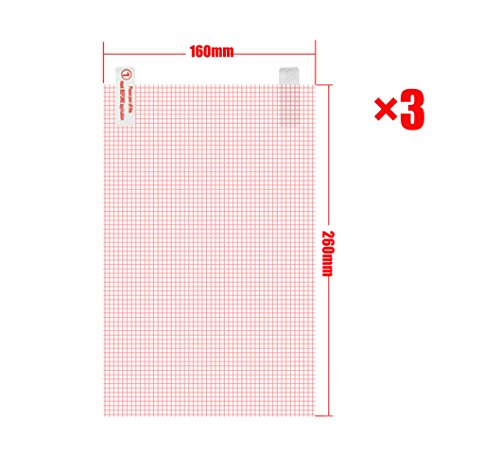
FanTEK 3 Pack Universal Clear Screen Protector for Dragon Touch NeuTab RCA DigiLand iDeaUSA AMARELEC Tagital Elecost ValuePad ProntoTec SVP Alldaymall PolaTab Proscan iRulu Aoson VV (10.2 x 6.3 inch)

Product Description
FanTEK 3 Pack Universal Clear Screen Protector for Dragon Touch NeuTab RCA DigiLand iDeaUSA AMARELEC Tagital Elecost ValuePad ProntoTec SVP Alldaymall PolaTab Proscan iRulu Aoson VV (10.2 x 6.3 inch)
- Dimensions: 260mm x 160mm. Only fit this size screen or small
- Protects your touch screen from most of dust and scratches
- The grid allows accurately cut and easy install
- This screen protector is universal, need you choose the same or larger then cut it to the suitable size
- Package includes: 3x Screen Protector, 1x Cleaning Cloth
Features:
* FanTEK is a Registered Trademark which was authorized by UNITED STATES PATENT AND TRADEMARK OFFICE
* After-sales service: We offer 30 Days Return without any reason, 90 Days Replacement if the product has any quality problems
* Free and Fast Shipping, 7-15 Business Days Delivery
* The screen protector come with high-quality adhesive coating for easy bubble-free placement and clean removal with no sticky residue.
* The screen protectors feel smooth and maintain the sensitivity, quick responsiveness in your touch-screen
* More Colorful Cases and Various Screen Protectors are available, welcome to FanTEK store
Application Instructions:
* Step 1: Thoroughly clean the display with the cleaning cloth (provided). Use tape if necessary. Once your device is cleaned, do not touch the surface - no fingerprints please
* Step 2: Peel off the corner of the BACK outer layer (Tab 1).Do not touch the surface of the film directly. Work by gently holding the edges of the screen protector
* Step 3: Align the exposed corner edge with the corresponding edge of the device display. Slowly lay the screen protector from one end to the other
* Step 4: Slowly peel away the rest of the BACK outer layer (Tab 1) from underneath. Make sure the screen protector remains aligned with the display
* Step 5: As you peel away the BACK outer layer (Tab 1), run your fingers along the top of the FRONT outer layer (Tab 2)
* Step 6: Once applied, using thumbs or a card to work any bubbles out. Make them escape from the nearest place - the edge of the tablet or one of the precut holes
* Step 7: Use the cleaning cloth (provided) to wipe away any remaining fingerprints or smudges
Technical Specifications
You might also like
Infiland Premium PU Leather Case Cover for DigiLand 10.1 DL1008M DL1010Q / NeuTab N10 Plus 10.1/ rotor 10.1/ iDeaUSA CT10/ Elecost OctaTab 10.1/ IRULU X1 Pro Lightning 10.1 Inch Tablet- Blue

Dragon Touch X10 10-Inch 16GB Octa Core Tablet with 5.0 MP Camera and Android 5.1 Lollipop

iDeaUSA Portfolio 10 - Black Leather Portfolio Cover for 10 inch Tablets