
Guermok
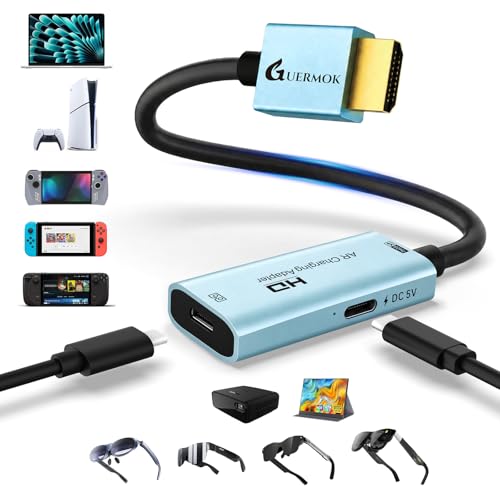
AR Glasses HDMI to USB-C Display Adapter, 4K@60Hz Play and Charge AR Converter with DC 5V, for XREAL One/Air 2 Pro/RayNeo/Rokid, Switch 2/1, Xbox1, PS4/5, Portable Monitors (Blue)
Free shipping with 3 or more products in your cart
Alternative sizes, colours, or choices are currently unavailable.
Payflex: Pay in 4 interest-free payments of R300.25. Read the FAQ
R 1,201
In stock
Duties, insurance and VAT included
Delivered in 10–20 working days —



Free shipping with 3 or more products in your cart
Secure checkout
Your payment is fully protected
Duties & VAT included
No surprise charges at the door
Tracked delivery
Track your order end to end
Returns support
30-day return window
Description
- 【4K@60Hz Ultra HD for AR Immersion】No USB-C Cable Included. Supports crisp 4K resolution at 60Hz for vivid, smooth visuals—ideal for AR glasses. Ideal for watching movies, gaming, or mirroring content. Compatible with HDMI output devices, such as gaming consoles, media players, and streaming devices. Please ensure your AR glasses support USB-C video and audio input before use. Note: If audio is not heard on certain AR glasses, please manually set the audio output to DisplayPort (DP) in the device's audio settings
- 【Compact, Sturdy & Clear Usage】Aluminum alloy shell provides good heat dissipation and portability. This HDMI to AR glasses adapter fits easily in your pocket or bag for mobile use. Supports one-way video transmission from HDMI (source) to USB-C (display) only; bidirectional use is not supported. Not compatible with headsets or docks. Audio is not supported when connected to Studio Display. Please use an external audio device for sound. Ensure your AR glasses support USB-C video input (DP Alt Mode) and use certified USB4 or Thunderbolt 3/4/5 cables. Higher-power devices need additional power to avoid flickering or a black screen
- 【Play & Charge with 5V Power Port】This HDMI to USB C adapter features a Type-C 5V power port (1–1.5A) to supply power directly to connected USB-C displays or AR glasses, ensuring stable operation during use. The adapter must be connected to a power source to function. Use a compatible power source to ensure stable operation during extended use. Devices that require more power than 5V 1–1.5A will not work with this port
- 【Wide Device Compatibility】HDMI to USB-C display-only adapter designed for one-way video transmission from an HDMI source to a USB-C display. VR headsets are not supported and require a capture card. Compatible with AR glasses that support USB-C video input. Works with HDMI output devices, including game consoles in TV mode (such as PS4/5, Switch2/1, Xbox1), media players, and HDMI streaming devices. Also supports USB-C portable monitors and USB-C projectors for immersive viewing, gaming, and productivity
- 【Plug & Play, Low Latency】Just plug and play with this HDMI converter to USB-C for effortless connection to your AR glasses. Travel-friendly design makes it ideal for mobile setups, AR gaming, or business on the go. Ensure your USB-C device supports HDMI 2.0 (4K@60Hz). Package includes: 1× HDMI to USB-C adapter, 1× User Manual. Use shorter cables when possible, longer cables may reduce signal strength
- 【Compatibility Notice – Please Read Before Use】ONLY for AR glasses or USB-C display devices that support video input (DP Alt Mode). NOT compatible with most laptops, tablets, phones, or standard USB-C ports. Compatibility may vary across different USB-C devices. One-way use only (HDMI to USB-C, not reversible). External 5V power is REQUIRED—no power = no signal. Incorrect connection order or unsupported devices may result in no display. Please check device compatibility before use. Slight warmth during use is normal
Technical Specifications
Manufacturer
Guermok
Model
GM-161-Blue
Color
Blue
Size
0.74FT
Height
1.1 cm
Length
4.5 cm
Width
2.3 cm
Weight
0.02 kg
Shipping & Delivery
Your order is shipped from the USA and delivered to your door in South Africa in 10–20 working days. All items are fully tracked.
Returns & Exchanges
We offer a 30-day return window. If something isn't right, contact our support team and we'll make it right.