
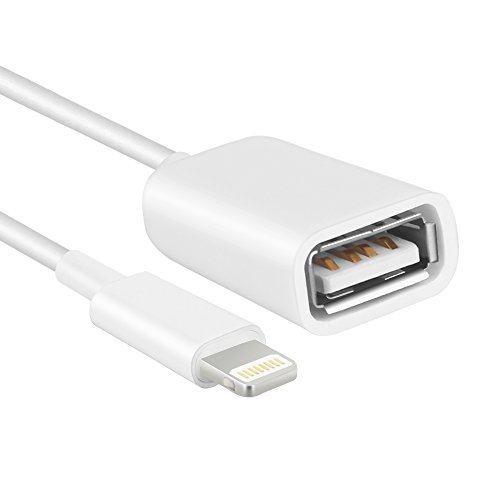
HIOTECH OTG Adapter Cable - Premium Lightning 8 pin to USB Female OTG Adapter Cable for iPad & iPhone (iPhone Must OVER IOS 9.2 System, Not Support iOS 10.3.1)
Product Description
HIOTECH OTG Adapter Cable - Premium Lightning 8 pin to USB Female OTG Adapter Cable for iPad & iPhone (iPhone Must OVER IOS 9.2 System, Not Support iOS 10.3.1)
- CONNECT USB FLASH DISK: Make sure that the Elctric Current of USB Flash Disk not 200MA or Over! This product could not support iOS 10.3.1.
- CONNECT KEYBOARD: Mobile phone Chat / Work typing is Slow? Connect your keyboard with this OTG Adapter, enjoy typing speed as a computer.
- CONNECT CAMERA: During the travelling, cannot share the scenery and the mood record in camera? With this OTG Adapter, connect your camera to iPhone / iPad, copy beautiful scenery / mood to share it at any time, any where.
- TPE ENVIRONMENTAL MATERIAL & HIGH PURITY WIRE CORE: TPE rubber production, possess toughness and elasticity. High purity wire core, improve the efficiency of data transmission. Transmission is more stable!
- WIDELY COMPATIBLE: Support apple Lightning interface. iPad 4, iPad Air / Air 2, iPad Mini / Mini 2 / Mini 3. iPhone 5 / 5s, iPhone 6 / 6s / 6 plus / 6s plus. (iPhone Must OVER IOS 9.2 System)
Attention in using: 1. When connect with sub device, you can't put photos in the u disk directly, must create a new file named "dim" (most camera have this file). Then send photos to this file, insert the sub to tog, after 37 seconds, iPad will automatically popup the picture window. 2. For the images or video, firstly you must input them in your iPhone or iPad, can view or modify. 3. The camera image format must be JPEG or raw. For other images, they must be named imp_.Jpg, "" is four random numbers. For example: img_1234.Jpg. Common problems: a:the flash disk does not work with iPad or iPhone? Q:in this case, you must make sure that the electric current of sub flash disk not 200ma or over. A: how to know your u disk working current? Q: first, you should download "chip genius" software on your computer. Then insert u disk into the computer, use "chip genius" to detect the u disk information. Note: when used with iPhone which must has over IOS 9.2 System! make sure that the electric current of sub flash disk not 200ma or over! keep the iPhone / iPad is unlocked and the screen is bright. Dim folder will automatically popup. If your iPhone / iPad is locked, it will not popup. Must create a new file named"dcim".
Technical Specifications
You might also like
PinPle 2348702 Premium Lightning 8 pin to USB Female OTG Adapter Cable for iPad 4 & iPad Mini

Apple Lightning to USB Camera Adapter
Etre Jeune Adapter Splitter Compatible for IP X, Dual Headphone Audio & Charge Adapter,Headphone Jack Audio & Charge Cable at The Same time for IP 8/8Plus 7/7Plus

Griffin Technology Griffin Wired Keyboard
iPhone OTG Adapter 2 Pack, Adwox Lightning 8-Pin to USB Female OTG Adapter for iPad 4 and iPad Mini
UGREEN Micro USB to USB, Micro USB 2.0 OTG Cable 2 Pack On The Go Adapter Micro USB Male to USB Female for Samsung S7 S6 Edge S4 S3, LG G4, Dji Spark Mavic Remote Controller, Android Tablets (Black)

AmazonBasics Micro USB to Lightning Adapter - Apple MFi Certified

Apple Lightning to USB3 Camera Adapter
OnlyKey with Stealth Black Case - Hardware Password Manager, 2 Factor, Secure Communication (U2F, YubiKey OTP, Google auth, SSH, PGP/GPG) Make Password Hackers Obsolete.

Cable Matters 2-Pack Gold-Plated SuperSpeed USB 3.0 Coupler (USB Coupler Female to Female Adapter)