
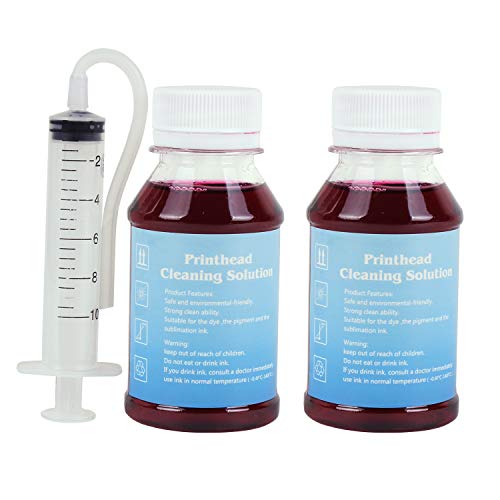
Inkjet Printers Printhead Cleaner Nozzle Cleaning kit for WF-7620 WF7710 WF-7720 WF 7210 WF 3630 WF-2630 WF-2660 WF-7520 WF-7510 WF-7010 WF-3540 WF-3530 WF-3520 WF-3720 XP-440 XP-340 XP-446-A1 100ml*2
Product Description
Inkjet Printers Printhead Cleaner Nozzle Cleaning kit for WF-7620 WF7710 WF-7720 WF 7210 WF 3630 WF-2630 WF-2660 WF-7520 WF-7510 WF-7010 WF-3540 WF-3530 WF-3520 WF-3720 XP-440 XP-340 XP-446-A1 100ml*2
- To solve illegible marking caused by print head clogging (vertical stripes, horizontal stripes, text printing or incomplete patterns.)
- It contains high-performance ingredients such as active enzymes, strong cleaning, environmentally friendly and would not corrode the print head.
- 80-90% success rate (Depending on the length of inactivity of your printer will determine the effectiveness of this product.), Need not to disassemble the print head with simple operation.
- It applies to OEM/factory ink, dye, pigment, sublimation ink, heat transfer ink and alike.
- For printer models:Workforce 60 320 323 325 545 630 633 635 645 840 845 NX125 NX127 NX130 NX230 NX420 NX530 NX620 WF-2630 WF-2660 WF-3520 WF-3530 WF-3540 WF-7010 WF-7510 WF-7520 WF-3720 XP-440 XP-340
Directions:
1. Heat the cleaning fluid.
2. Print the "nozzle checking" test page to confirm the color to be cleaned.
3. Pick out the ink cartridge.
4. Inject the cleaning fluid into the print head that needs cleaning with a syringe, and wait for 10-12 hours,as shown in Figure 3.
5. Install the ink cartridges and run the "nozzle cleaning" function twice in printer driver.
After cleaning, if the clogging is more serious, maybe it's because the cleaning liquid hasn't been totally discharged and still stays inside the print head. Please follow the following steps:
1. If you have the refill ink for this printer, you can inhale ink 4ML with a syringe and inject it into the ink inlet of the print head, then install the cartridge and run the driver's "Print head cleaning" function 1 times.
2. If you do not have the refill ink for this printer, you can use an empty syringe (do not need to inhale anything)to connect with the ink inlet of the print head, repeatedly push and pull the plunger of the syringe to discharge the cleaning liquid. Then install the ink cartridge, and run the driver "print head cleaning" function 1 times.
3. If there is no improvement, you will need to wait 2 hours and try again to run the driver's "Print head cleaning" function 1 times. The above methods can be tried several times.
P.S.:More detail instructions and tools are included in the package.
Package content:
3.4 oz Printhead Cleaning Fluid
1×Syringe(10ML)
1×silicone tube
1×instruction manual
Cautions:
It may not work for serious clogging or when there is insoluble material inside the nozzle. You need to replace a new print head to solve the problem.
Technical Specifications
You might also like

Heavyweight Blotting Paper 8x6 (10 Sheets) for Caligraphy and Inkjet Printer Cleaning
Remanufactured 127 T127XL Ink Cartridges Compaitble For Workforce WF-3520 WF-3530 WF-3540 WF-7010 WF-7510 WF-7520 Printer (4black,2 cyan, 2 magenda,2 yellow)

E-Z Ink (TM) Remanufactured Ink Cartridge Replacement for Epson 127 T127 to use with NX530 NX625 WF-3520 WF-3530 WF-3540 WF-7010 WF-7510 WF-7520 545 645 (6 Black, 2 Cyan, 2 Magenta, 2 Yellow) 12Pack

Printhead Cleaner for Epson Printers - 5oz 150ml

E-Z Ink (TM) Remanufactured Ink Cartridge Replacement for Epson 126 T126 (6 Black, 2 Cyan, 2 Magenta, 2 Yellow) 12Pack for WorkForce 435 520 545 635 645 WF-3520 WF-3530 WF-3540 WF-7010 WF-7510 WF-7520

Epson DURABrite XL T127120 Ultra 127 Extra High-capacity Inkjet Cartridge-Black

EPSON Ink Maintenance Box for WorkForce 3520/3530/3540/3620/7010/7510/7520/7110/

LD Products Remanufactured Ink Cartridge Replacement for Epson 220XL ( Black,Cyan,Magenta,Yellow , 5-Pack )

Print Head Cleaning Kit for Epson Canon Brother and HP printers - 17oz 500ml
Bestcompu Print Head For EPSON 3520 3540 WF3520 WF7010 WF40 WF600 Wf-7520 7525 7015 7510 TX600FW TX610FW WF633 F190020