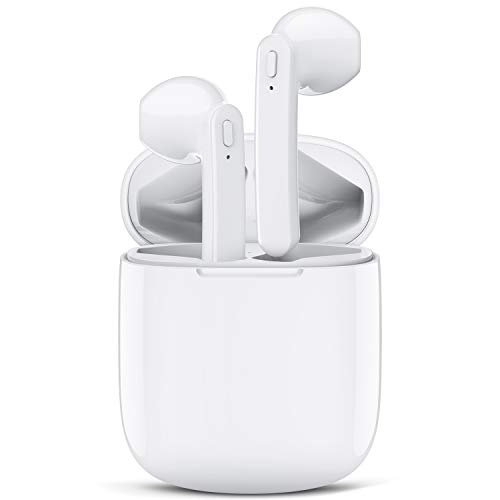

LASUNEY Waterproof Bluetooth 5.0 True Wireless Earbuds, 30H Cyclic Playtime Headphones with Charging Case and mic, in-Ear Stereo Earphones Headset for Sport-White
After connected, you can control your music and accept or reject calls with just one button, really wireless. With ergonomic design, own incredible comfort and seamless sound that sits effortlessly in your ears. Let you immerse yourself in the music.
Newest Bluetooth 5.0 Tech For Stable Connection---LASUNEY Wireless Bluetooth Earbuds adopt the most advanced Bluetooth 5.0 technology, supporting HSP, HFP, A2DP, AVRCP. Provides in-call stereo sound and fast, stable transmission. You just need to open the charging case and connect to “T19” on your device. They will connect to the last connected device automatically after first used.
NOTE: Please removed the plastic films cover on the charging points of the earbuds and get them fully recharged before first use.
Why Choose LASUNEY True Wireless Earbuds? 1.LASUNEY offers a pair of high-fidelity Bluetooth Wireless Earphones with up to 30 hours of battery life. 2.You won't be subject to master-slave restrictions and enjoy one-click manipulation. 3.Light weight, easy to carry, you can use it anytime anywhere, just enjoy your life.
How to Use Multifunction Button? Previous Song: Long press L Multifuction Button 2s Next Song: Long press R Multifuction Button 2s Play / Pause: Short press Multifuction Button Pick up / Hang up phone call: Short press Multifuction Button Decline Incoming call: Long press Multifuction Button 2s Activate / Disable Siri: Double-press the Multifunction Button
Package Contents: 1x LASUNEY Wireless Earbuds 1x Earbud Charging Case 1x USB Charging Cable 1x User Manual
Notes: If you receive a defective product or have any questions during use, please feel free to contact us.
When the two earphones can't pair with each other or can't connect to your device, How To Reset? 1. Forget the "T12" earbuds device from your bluetooth on your phone. 2. Take out two earbuds from the charging box and turn them off. 3. Long press the Multifunction Button of the left and the right earbud for 15 seconds until there are orange and white lights flashing for 1 second and then turn off automatically. 4. Turn on the earbuds again, after 2 seconds, double press Multifunction Button of both earbuds and they will connect to each other. After connected successfully, both LED lights will have orange and white lights flicker alternately. After resetting, please connect the earbuds to your phone according to the above methods.