
Ardaddyn
Memory Card Reader - 4 in 1 SD/MicroSD/MS/XD Card Reader Memory Stick Pro Duo Adapter for Sony Cybershot SD, Lightning/USB-C/USB-A Triple SD-Card Reader for iPhone 17/16/15/14/iPad/PC/Android/Camera
Free shipping with 3 or more products in your cart
Payflex: Pay in 4 interest-free payments of R302.75. Read the FAQ
R 1,211
In stock
Duties, insurance and VAT included
Delivered in 10–20 working days —



Free shipping with 3 or more products in your cart
Secure checkout
Your payment is fully protected
Duties & VAT included
No surprise charges at the door
Tracked delivery
Track your order end to end
Returns support
30-day return window
Description
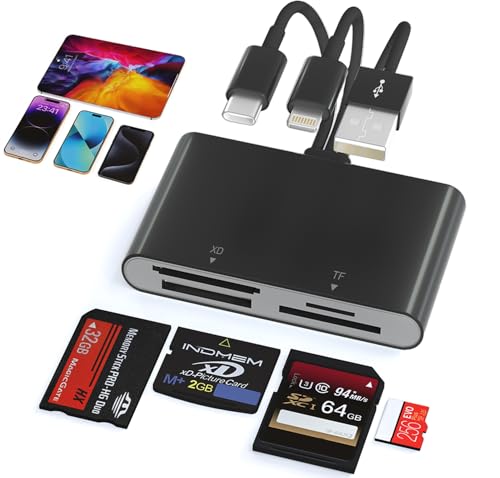
- 3-in-1 Multi-Port Design: This memory stick duo adapter features Lightning, USB-C, and USB-A ports, which is compatible with various devices and operating systems. Whether your use i-Phone/i-Pad PC or other USB C phone device, you can easily connect and use this card reader
- 4-in-1 Multi-Card Support: The memory stick adapter comes with SD/TF/XD/MS four card slots. It supports a wide range of card types such as Memory Stick Pro Duo, Memory Stick Pro-HG, Memory Stick Duo, olympus xD-Picture card, SD/SDHC/SDXC and microSD memory card.This design avoided need for separate card readers for each card format, thus saving both space and hassle
- High-Speed 480Mbps Transfer: Experience rapid file transfers with 480Mbps(max) speeds, perfect for photographers, videographers, and professionals handling large media files. Save time and boost efficiency. Note: Actual speed varies by device
- No Drivers Needed: The sd memory card reader plug and play, eliminates the need for additional drivers, providing a seamless user experience. Simply connect it and start transferring data effortlessly. Say goodbye to complicated setup processes and enjoy hassle-free file access, easily transfer photo video and file information
- Sleek & Portable: Compact and durable with efficient heat dissipation, this lightweight reader fits easily in your pocket or bag—ideal for on-the-go file transfers and office use
- Kind tips: Please make sure the memory card is correctly inserted into the card reader. (When some Android phones are plugged in for the first time, a format mismatch prompt may pop up and the U disk needs to be formatted. Please back up the files on the SD card and format the SD card to FAT32 format. It can be used normally after formatting, and there is no need to perform this operation again in the future.)
Technical Specifications
Manufacturer
Dongguan Lijie Electronic Technology Co., Ltd.
Model
AP555-B
Color
Black
Shipping & Delivery
Your order is shipped from the USA and delivered to your door in South Africa in 10–20 working days. All items are fully tracked.
Returns & Exchanges
We offer a 30-day return window. If something isn't right, contact our support team and we'll make it right.