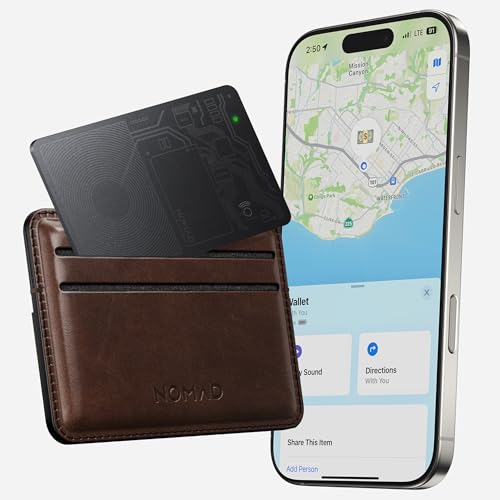
Nomad Tracking Card Air Carbide, Slim Card Tracker with IPX7 Waterproof and Dust Proof Card Tracker for Wallet & Luggage, 5 Months GPS Tracker Long Battery Life, Rechargeable, Compatible with iOS Only
Sold Out / Out of Stock
Please be aware orders placed now will not arrive in time for Christmas, please check delivery times.
This item may be available in a different size, colour, scent, version or platform:
Nomad Tracking Card Air Carbide, Slim Card Tracker with IPX7 Waterproof and Dust Proof Card Tracker for Wallet & Luggage, 5 Months GPS Tracker Long Battery Life, Rechargeable, Compatible with iOS Only
Remarkably Slim: As thin as just 2 standard credit cards, Tracking Card is one of the slimmest trackers on the market. It easily slips into any wallet without adding any bulk. Works great as a credit card tracker for wallet too.
Tracking Made Easy: If you're anything like us, you've probably lost something important during a grand adventure. That's why we created our Nomad wallet tracker & smart card. Simply open Apple's Find My app, track your wallet, and get going.. Compatible with IOS only.
Wireless Recharge: Our wallet card tracker wirelessly charges on any Qi or MagSafe wireless charger, including upright MagSafe models.
Lasting Battery: Once charged, our wallet GPS tracker card will last in your wallet for up to 5 months. Rechargeable batteries cut back on waste and save you the time and energy associated with buying new batteries.
Waterproof and Dust Proof: Certified smart track card with Waterproof and Dust-Proof with IPX7 giving you all the protection for any adventure.
Pairing Your Tracking Card is Easy: Press and hold the button for 5 seconds to turn it on. Open the Find My app, select Items > Add New Item (+) > Add Other Item. When Nomad Card appears, tap to connect and set a custom name and icon.
Most issues with Tracking Card can be resolved by performing a factory reset. To reset your Tracking Card, follow the steps below. 1) Open the Find My app, navigate to the "Items" tab, and tap your Nomad Tracking Card. 2) Scroll to the bottom of the Item Detail card, tap "Remove Item," and follow instructions. 3) On the Tracking Card, press the Find My button 5 times quickly and hold the button on the 5th press. 4) Your Tracking Card will play a tune and perform the reset.