
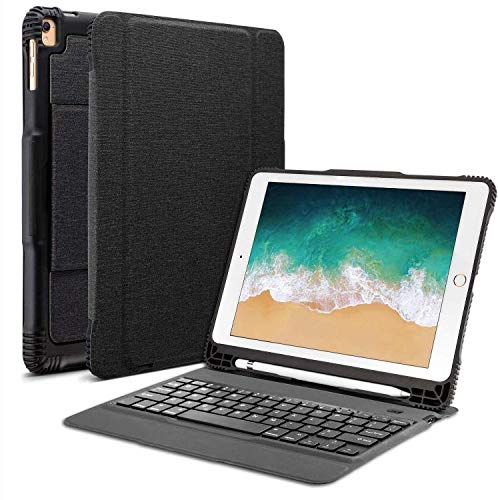
OMOTON Detachable Keyboard Case for New iPad 9.7” 2018&2017, iPad Pro 9.7, iPad Air 1 / Air 2 9.7", Ultra-Thin Bluetooth Keyboard Case with Built-in Stand and Pencil Holder, Lightweight, Black
Product Description
OMOTON Detachable Keyboard Case for New iPad 9.7” 2018&2017, iPad Pro 9.7, iPad Air 1 / Air 2 9.7", Ultra-Thin Bluetooth Keyboard Case with Built-in Stand and Pencil Holder, Lightweight, Black
OMOTON - Better than You Expect!
Compatibility
This bluetooth keyboard case fits
iPad 9.7''[2018 latest model]
iPad 9.7'' [2017], Model Number: A1822 / A1823
iPad Pro 9.7" [2016], Model Number: A1673 / A1674 / A1675
iPad Air 2 [2014], Model Number: A1566 / A1567;
iPad Air [2013], Model Number: A1474 / A1475 / A1476.
Seamless Connection
With Bluetooth 3.0 technology applied, OMOTON Ultra-thin Detachable Keyboard Case will connect your iPad smoothly.
Simple Switch
This premium keyboard case allows you to easily switch from tablet mode to laptop mode anytime.
Maximum Protection
Made of soft premium PU leather cover and protective hard PC material back shell. OMOTON Ultra-thin Detachable Keyboard Case provides your iPad all-round protection and impressive performance.
Specifications:
1.Bluetooth 3.0 technology
2.Up to 33 feet/10 meter effective operation distance
3.Working Voltage:3.0-4.2 V
4.Charging Time:2.5-3 hours
5.Charging Input: Micro USB
Package Content:
1x OMOTON Ultra-thin Detachable Keyboard Case
1x Micro-USB Charging Cable
1x User Manual
Steps to pair the keyboard with your device
1. Install the device, pull out the stand in the back to stand the iPad.
2. Power on the keyboard by switching the ON/OFF button to the right. Then press "Fn+C" to activate Bluetooth connection on your keyboard.
3. Activate Bluetooth on your iPad and set it to search for new device.
4. Select "Bluetooth 3.0 Keyboard"
5. Type the numbers appear on the iPad in the keyboard and press the Enter key to establish connection.
Attention:
For the function keys on the top line of the keyboard, please press and hold the FN key and then choose the F-key you want to use.
Technical Specifications
You might also like
IVSO Wireless Keyboard Case for Apple New iPad 9.7 Ultra-Thin Stand Keyboard Case with Pencil Slot for New iPad 9.7 2018/2017/ iPad Pro 9.7 /iPad Air 2/ iPad Air Tablet (Black)
New iPad 9.7" (2018 & 2017) / iPad Pro 9.7 / iPad Air 2 / iPad Air Screen Protector, SPARIN Tempered Glass Screen Protector - Apple Pencil Compatible/High Definition/Scratch Resistant

Apple Pencil

[3-Piece] Fintie Bundle for Apple Pencil Cap Holder/Nib Cover/Charging Cable Adapter Tether for Apple Pencil 1st Generation, iPad 6th Gen Pencil, White
OMOTON 9H Hardness Tempered Glass Screen Protector Compatible iPad 9.7" (2018 & 2017) / iPad Pro 9.7 / iPad Air 2 / iPad Air - Clear (2 Pack)

Fintie iPad 9.7 2018 Case with Built-in Apple Pencil Holder - [SlimShell] Lightweight Soft TPU Back Protective Stand Cover with Auto Wake/Sleep for Apple iPad 2018 9.7 Inch (6th Gen), Black

[2 Pack] New iPad 9.7" (2018 & 2017) / iPad Pro 9.7 / iPad Air 2 / iPad Air Screen Protector, SPARIN Tempered Glass Screen Protector - Apple Pencil Compatible/High Definition/Scratch Resistant

New iPad 9.7 2018/2017 Case with Pencil Holder, Soke Smart iPad Case Trifold Stand with Shockproof Soft TPU Back Cover and Auto Sleep/Wake Function for iPad 9.7 inch 5th/6th Generation, Dark Grey
Coastacloud 2018 Upgrade Shockproof iPad Pro 10.5 Keyboard Case with Pencil Holder, Detachable Bluetooth Keyboard with Shockproof Heavy Duty Full-Body Protective Case for iPad Pro 10.5 inch
Apple iPad Pro Tablet (32GB, Wi-Fi, 9.7") Space Gray (Refurbished)