
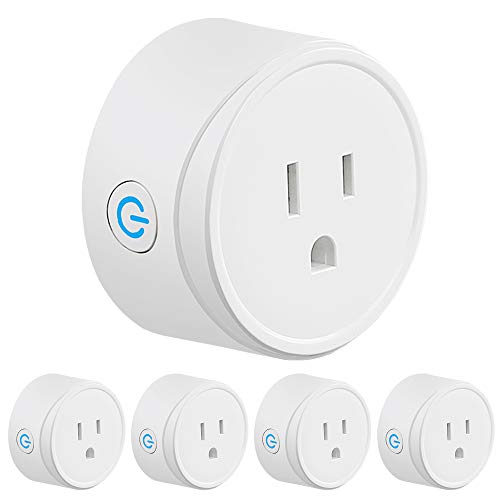
OUKITEL WiFi Plug use with Alexa Echo/Google Home/IFTTT, X6P Smart Socket, Remote Control, Timer, no hub Required, Listed-4 Pack, White
Product Description
OUKITEL WiFi Plug use with Alexa Echo/Google Home/IFTTT, X6P Smart Socket, Remote Control, Timer, no hub Required, Listed-4 Pack, White
- COMPATIBILITY: OUKITEL X6P Works flawlessly with ALEXA, GOOGLE ASSISTANT & IFTTT. No hub required. Requires Android 4.4 or above & IOS 8 or above.
- AROUND THE GLOBE: No matter where you are, turn on/off home electronics. Manage up to 50 electronic appliances - one electronic appliance per smart plug.
- CERTIFICATION & WARRANTY: ETL certification ensures complete protection. With OUKITEL smart plug get 90 day unconditional full refund guarantee and 12-Month limited warranty
- [Easy to install and stabilize the connection] Step 1: Search "Smart Life" on App store, Google Play or Scan the QR code on User Manual to download and install it. Step 2:Set up your Smart Life account Step 3:Plug OUKITEL X6P into an AC outlet Step 4:Add Device>ELECTRICAL OUTLET and confirm the device in the App. Step 5:Connect the plug to your local WIFI with your phone connecting to it. Step 6:Schedule your appliances.(Only supports 2.4GHz Wi-Fi network) *
OUKITEL Dual Mini Wi-Fi Smart Outlets
The OUKITEL X6P Wi-Fi Smart Plug uses your existing home Wi-Fi network to provide wireless control of your lights and appliances. No subscription or hub is required: simply plug OUKITEL X6P into an electrical outlet, connect a device to the Smart Plug, and wirelessly control your device using a tablet or phone. Using the free Smart Life app, you can turn your devices on and off and set worry-free schedules from anywhere in the world, so that they run on your schedule. You’ll find that automating your devices will help streamline your daily routine for a more efficient household.
Easy to Set Up
Step 1: Search "Smart Life" on App store, Google Play or Scan the QR code on User Manual to download and install it.Â
Step 2:Set up your Smart Life accountÂ
Step 3:Plug OUKITEL X6P into an AC outletÂ
Step 4:Add Device>ELECTRICAL OUTLET and confirm the device in the App.
Step 5:Connect the plug to your local WIFI with your phone connecting to it.Â
Step 6:Schedule your appliances.(Only supports 2.4GHz Wi-Fi network)
Features:
Energy saving
10A maximum load
Set schedules/timers
Remote control devices
Share control with your family
2 IN 1 Individual/Group Control
Works with Alexa/Google Assistant/IFTTT
Technical Specifications:
Maximum current: 10A
Rated voltage: 120V
Rated power: 1200W
Input voltage: 100~240V
Working temperature: -4~140°F
Non-isolated power supply design scheme
Wireless type: wi-fi 2.4ghz
Support system: Android 4.1 \ IOS 8.0 version above
Two AC output jack, physical key control and APP control
No packing size: 1.86inch*0.9inch*0.41inch
Net weight: 2.82ounces
Technical Specifications
You might also like
Echo Dot (3rd Gen) - New and improved smart speaker with Alexa - Charcoal

Yuanling Outlet Wall Mount Hanger Stand for Dot 3rd Gen, A Space-Saving Solution for Your Smart Home Speakers Without Messy Wires or Screws (Dot 3rd Black 2 Pack)
Wifi Light Switches,Smart Switch, Alexa Switch Compatible with Google Home and IFTTT, Wireless remote control, White Neutral wire required, Physical Button (2 gang)
Echo Dot (2nd Generation) - Smart speaker with Alexa - Black

Outdoor Smart Plug, Surge Protector, POWRUI Smart Power Strip with 4-Outlet Extender, Remote Control, Timer, Weatherproof for Indoor and Outdoor Use, Compatible with Alexa, Google Assistant and IFTT

Echo (2nd Generation) - Smart speaker with Alexa - Charcoal Fabric

WiFi Smart Power Strip Surge Protector with 4 Smart Plugs and 4 USB Ports and 5.9ft Long Extension Power Cord, Work with Alexa & Google Assistant

Smart Light Switch, Gosund 15A Smart Wifi Light Switch with Remote Control and Timer, Works with Alexa, Google home and IFTTT, No Hub required, Easy and Safe installation, ETL and FCC listed. (2pcs)
Sengled Smart LED Soft White A19 Starter Kit, 2700K 60W Equivalent, 2 Light Bulbs & Hub, Works with Alexa & Google Assistant