
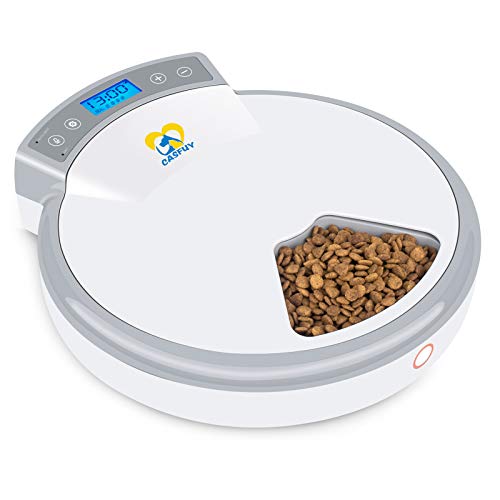
Out of Stock-Casfuy 5-Meals Automatic Cat Feeder - Auto Pet Feeder with Programmable Timer Dry and Wet Food Dispenser Voice Recorder & Speaker for Cat and Small Medium Dog Portion Control



Description
There's nothing more fun than having a snugly kitty at home after a long day at work. But keeping them well-fed, especially when you're not at home, can be challenging. That's why we created Casfuy Automatic Cat Feeder that features five wet & dry food storage compartments, a built-in vocal message system so you can leave them the sound of your voice, and a programmable timer to make sure you're staying on top of healthy nourishment and weight management.How to set Casfuy automatic pet feeder? 1.Plug in or install 4 C-size batteries and switch on. Blue backlight means unlock mode. 2.Press SET, hour digit will flash. Press + or - to the hour and press SET again to save. Set minute the same way as hour-setting. 3.In meal time setting mode, No. icon starts from â‘ . Repeat the steps above to set meals (up to 4). Long press SET for 3 seconds to exit. No. icons will tell how many meals you've set. 4.Press and hold RECORD. Speak into the Recording Port to record your message (up to 10 seconds). Release when you finish. Press RECORD to play.Tips:1.Apply automatic feedings when really necessary. Over-relying may influence the connection between pet kid and human. 2.Installing batteries as a backup to ensure feeder functions even in a power outage. 3.Press SET and + simultaneously to unlock, press these 2 again or wait non-operation 30s to lock. 4.Don't overload the tray, in case food is jammed when impeller rotates. 5.Guide your cat/dog to wait at the automatic food dispenser and acclimate to its new feeder.What you can get: 1* Automatic pet food dispenser 1* Power adapter 1* User manual
Technical Specifications
Shipping & Delivery
Your order is shipped from the USA and delivered to your door in South Africa in 10–20 working days. All items are fully tracked.
Returns & Exchanges
We offer a 30-day return window. If something isn't right, contact our support team and we'll make it right.