
PCI-E 3.0 Riser Cable PCIe Extension Cable for Graphics X1 to X1/ M to F/90° to 90° for M.2/ WiFi/Network/USB/Sound Cards PCIe 3.0 X1 Riser Cable Accessories Reparation Parts(100mm)
R 908
or 4 x payments of R227.00 with
Availability: Currently in Stock
Delivery: 10-20 working days
Please be aware orders placed now may not arrive in time for Christmas, please check delivery times.
PCI-E 3.0 Riser Cable PCIe Extension Cable for Graphics X1 to X1/ M to F/90° to 90° for M.2/ WiFi/Network/USB/Sound Cards PCIe 3.0 X1 Riser Cable Accessories Reparation Parts(100mm)
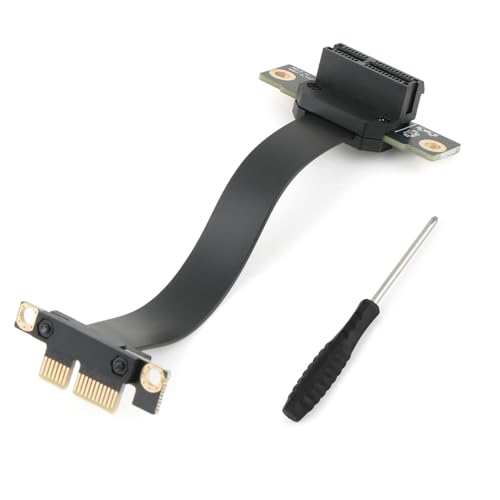
Scope of Application: The PCI-E 3.0 1X riser cable can be used for sound cards, network cards, USB adapter cards, SATA cards, M.2 hard drive adapter cards, etc. As long as the expansion card supports the PCIE slot, it can be used. If your PCIE slot is blocked, you can use the extension cable to achieve this function (supports PCIE3.0/2.0/1.0, but not PCIE4.0).
Good Transfer Speed: The inner material of the PCI-E 3.0 1X riser cable is made of tin-plated pure copper, which can quickly dissipate heat without compromising transmission efficiency and functional use. Professional testing ensures that the power transfer speed is not affected, so you can use it with confidence.
90-Degree Bendable: This PCI-E 3.0 1X riser cable features a 90-degree downward bend. The flexible cable body can be folded and bent. The 100m length makes the connection more flexible, easy to use, and saves more space for your chassis. Using the extension cable allows for flexible installation, which can improve the load-bearing capacity of the device during use and make the device connection more stable.
Good Signal: The pin of the circuit board uses a thickened gold-plated process to increase the connector's durability and strength, shield against noise, and ensure stable signal transmission. The PCI-E 3.0 1X riser cable uses an EMI anti-electromagnetic interference design with stable performance and strong anti-interference, effectively preventing freezes, frame drops, instability, and other problems during use.
Note: Before installing the PCI-E 3.0 1X riser cable, make sure the motherboard is powered off. Also, make sure you know the direction before installation. When installing, hold the pressure strips on both sides of the circuit board with two fingers and insert vertically downwards or pull it vertically upwards. The process is very simple. (Please do not insert diagonally, as improper installation will damage pin.)