
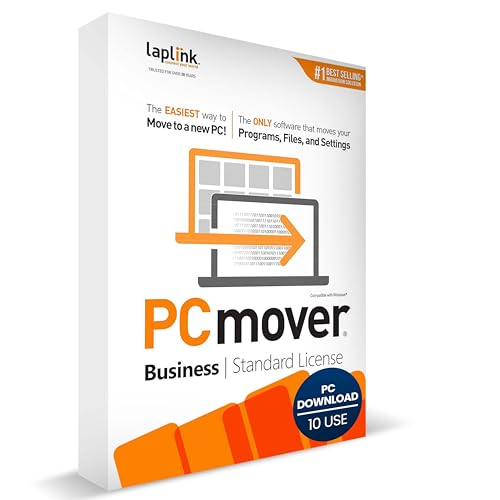
Laplink PCmover Business Standard- PC to PC Migration Software - 10 Use - Automatically Migrate New PCs - Reduce IT effort while saving time & budget
Product Description
Laplink PCmover Business Standard- PC to PC Migration Software - 10 Use - Automatically Migrate New PCs - Reduce IT effort while saving time & budget
- Upfront Licensing for Predictable Costs - Purchase licenses in tiers of 1, 5, 10, or 25 uses, providing a single serial number for multiple migrations. This model is ideal for organizations with known deployment volumes, allowing for straightforward budgeting and procurement.
- Comprehensive Migration Capabilities - Automatically transfer installed applications, user profiles, files, and settings between PCs. This ensures a complete and accurate migration, reducing manual setup time and minimizing end-user downtime.
- Flexible Transfer Methods - Supports multiple connection types, including network, USB, and Wi-Fi Direct. PCmover intelligently selects the most efficient method available, ensuring rapid and reliable data transfers even in bandwidth-limited environments.
- Advanced Deployment Options - Run PCmover from a memory stick, attached drive, or server share, enhancing flexibility for various deployment scenarios. This feature is particularly useful for organizations managing large-scale migrations or remote deployments.
- User-Friendly Interface with Selectivity Controls - An intuitive interface guides users through the migration process, offering selectivity options to choose specific applications, files, and settings to transfer. This ensures a tailored migration experience, aligning with organizational policies and user preferences.
PCmover Business is a quick and easy way to transfer the complete PC personality from one Windows PC to a different one, saving you hours or days of time in setup. PCmover's advanced features let you define which applications, documents, users, and settings to move to your new PC. If your computer has multiple users, PCmover Business gives you the option to transfer some or all of the users. The security information about file ownership and access control is preserved for each user, too. Windows Easy Transfer does not support Windows 10, making PCmover Business an even more critical application for saving businesses time and money.
Multiple Migration Paths and OptionsPCmover Business can migrate your PC across a network, a Laplink Ethernet cable, or a Laplink USB cable. Unlike any other migration software, PCmover supports a direct migration from an image or an old hard drive.
Laplink Software, Inc.For over 30 years, Laplink Software has been a global leader in PC connectivity. Our commitment to the needs of our customers has been the driving force behind all of our product development and has earned Laplink the loyalty and trust of millions of customers worldwide who migrate, transfer, synchronize, share, and remotely access their data.
What You Should Know- PCmover is not designed for migrations from newer operating systems to older operating systems.
- Display screen size: N/A
- Other (internet; browser): N/A
- Applications may require re-entry of a license code ore re-activating on the new PC. Certain system settings and applications may not be transferred due to their incompatibility with the operating system on the new PC.
Minimum System Requirements:
- Operating System: Windows 10, Windows 8, Windows 7, Windows Vista, Windows XP
- Processor: 32-bit and 64-bit
- Storage: 200 MB available space
Technical Specifications
You might also like

Preppy Kitchen: Recipes for Seasonal Dishes and Simple Pleasures (A Cookbook) (The Preppy Kitchen Series Book 1)

100 Afternoon Sweets: With Snacking Cakes, Brownies, Blondies, and More

Chicano Bakes: Recipes for Mexican Pan Dulce, Tamales, and My Favorite Desserts

The Perfect Loaf: The Craft and Science of Sourdough Breads, Sweets, and More: A Baking Book
JewelryPalace Princess Diana Kate Middleton Class Gemstone Birthstone Blue Sapphire Halo Statement Engagement Rings for Women, Anniversary 14K Gold Plated 925 Sterling Silver Promise Rings for Her 10

Tartine Bread

Merisny 24k Gold Rose Display Stand, Clear

That Day in May