
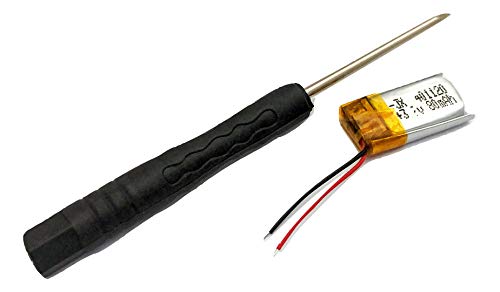
Tanin Auto Electronix Replacement Battery 3.7V 80 mAh | for Fitbit Charge & Charge HR | Free Torx Tool Included
Product Description
Tanin Auto Electronix Replacement Battery 3.7V 80 mAh | for Fitbit Charge & Charge HR | Free Torx Tool Included
- Solves common battery issues including draining too fast and not charging; replacing Fitbit battery will also eliminate the need to recharge Fitbit after only 1-2 days
- Fits Fitbit Charge & Fitbit Charge HR fitness smartwatches
- Expect up to 4 days of life after installing brand-new Fitbit battery
- 1-year warranty with proof of purchase
- Installation requires soldering, a precise flat head & torx tool; purchase will include the required torx tool & a link to video showing how to install the replacement battery
Battery for Fitbit Charge HR and Fitbit CHARGE. Common issues are battery draining too fast or battery not charging.
Installation video and TORX tool will be provided. You will need have an a fine ability to solder.
You should expect up to 4 days of battery life before needing to charge. If you do not see these results please contact us. Being in use, all day sync, heart rate monitor set to "on" instead of "auto", and other factors may decrease the time needed between charging.
If your Fitbit has water damage, endless fitbit "resetting" or power cycling, or other issues a new battery will not help you. Also please note that if you install the new battery and only get 6-12 hours of life then there is an underlying issue with the fitbit.
We also can waterproof your Fitbit. Please ask.
Things that affect battery life:
Each alarm you add up to the maximum of 8 reduces battery life by a small percentage.
Frequently pressing the button to check your statistics or the time may reduce the battery life.
Since Quick View causes the screen to light up whenever you turn your wrist towards you, turning this setting off may prolong battery life. When Quick View is off, press the button to see your stats.
If you're syncing with an Android device, the Always Connected option may reduce battery life.
If you're syncing with any Fitbit app, the All-Day sync option may reduce battery life on both the tracker and mobile device.
Charging your tracker in extreme heat or cold may reduce battery life.
If you don't need a heart rate rating, change the Heart Rate setting to Off. The Auto setting uses less battery than the On setting.
Technical Specifications
You might also like

Tool Repair Kit Precision Screw Driver Set Torx + Flat Head + Safe Plying Prying Pry Tool for Motorola Verizon Sprint ATT Cingular Razor and More

Zerofire For Fitbit Charge HR, Replacement Accessories Strap for Fitbit Charge HR/Charge HR/Fitbit Charge HR Accessories/Fitbit Charge HR 1/Charge HR Fitbit, Large,Black

Qty 2 Fitbit Charge HR Button Charging Clasp Replacement Plastic Band Clip

Newest Fitbit Charge HR Band, BeneStellar Silicone Replacement Small Large Band Bracelet Strap for Fitbit Charge HR Wireless Activity Wristband, Black, Large

Getwow for Fitbit Charge HR Charger,Replacement USB Charger Cable for Fitbit Charge HR Wireless Activity Wristband (Black)

TreasureMax For Fitbit Charge HR Bands, Adjustable Replacement Accessories Straps for HR Charge Fitbit/Fitbit Charge HR

CreateGreat for Fitbit Charge HR, Replacement Band for Fitbit Charge HR 1, Fitbit Charge HR Band,Charge HR Accessories Strap, Fitbit Charge HR Wristband,Large and Small
Fitbit Charge HR Wireless Activity Wristband (Tangerine, Large (6.2 - 7.6 in))
Vastar 2Pcs Replacement USB Charger Charging Cable for Fitbit Charge HR Band Wireless Activity Bracelet