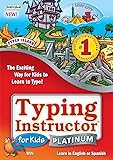
![Typing Instructor for Kids Platinum 5 - Windows [PC Download]](https://m.media-amazon.com/images/I/61FzgPsk1qL._SL500_.jpg)
Typing Instructor for Kids Platinum 5 - Windows [PC Download]
Product ID: B07KRWJ8WR
Condition: New
Payflex: Pay in 4 interest-free payments of R311.50. Read the FAQ
Available in other options.
R 1,246
includes Duties & VAT
Delivery: 10-20 working days
Ships from USA warehouse.
Secure Transaction
VISA
Mastercard
payflex
ozow
Product Description
Typing Instructor for Kids Platinum 5 - Windows [PC Download]
- Kids learn to type on an exciting adventure on Typer Island
- eaches keyboard basics following an age-appropriate Typing Plan – Meets National NETS/ISTE and Common Core Standards
- Learn in English or Spanish
- Exciting typing games motivate kids to keep typing
Product Description
Typing Instructor for Kids Platinum is the typing program for kids. It is the only typing software designed to teach young children to type that’s packed with just the right mixture of education, entertainment, and motivation, so kids can improve their typing skills quickly and see immediate results. Kids learn to type with 10 age-appropriate lesson plans for specific age groups, beginning with ages 6 & 7. Variety of ways to practice typing, with games, lessons, drills, advanced skill-building lessons and challenges, plus 40 engaging Practice Stories.
Kids learn to type on an exciting adventure on Typer Island. They learn all keyboard basics following an age-appropriate Typing Plan. Step-by-step lessons, challenges, tests, and games motivate kids to keep typing their way around the Island to reach the Castle, advance to the Lost City, and become touch-typists! Kids can learn in English or Spanish.
Island Adventure Theme Motivates Kids to Improve Typing Skills
Reward-Seeking Program!
This program offers rewards every step of the way! Kids visit distinct lands for lessons, challenges, tests, and games. They search for treasures, earn points, and add gold and jewels to their treasure box, on a journey to reach the Castle and become the Ruler of Typer Island. Once they reach the Castle, they advance to the Lost City, for more challenges and exciting games!
Explore Distinct Lands!
Kids visit The Old West, On the Water, In the Air, Over the Edge, and Under the Sea. They can take a break from lessons and go to Explorer Isle to play games, or to Story Lagoon to practice typing stories from Classic Literature and Fairy Tales.
Exciting Castle Adventures!
Once kids get to the Castle, they can play new games, like Tomb Typer and Xtreme Typing, and they can go to the Lost City for Treasure Quest and the ever-challenging Ziggy!
The Mysterious Lost City!
Kids get to visit the Lost City once they complete the lessons, tests, and challenges of all five lands on Typer Island and "Capture the Castle!" In the Lost City they can explore the ruins and the shipwreck, and play Treasure Quest, the first typing adventure game, and the challenging arcade action game, Ziggy.
30+ Game Challenges!
Typing Instructor for Kids Platinum uses "Entertainment Explosion," to make learning to type fun and exciting. Kids can play games in a variety of ways by selecting options from the game settings menu. Arcade-style play and multiple levels make games extremely challenging and fun.
Typing Tests
There are hundreds of tests in Typing Instructor Platinum for Kids. Tests measure speed and accuracy, and results are provided for adjusted words per minute, based on both typing accuracy and speed.
Instant Results Give Kids Incentive to Improve Keyboarding Skills
Typing Progress Results
Instant Feedback is provided on typing results. Kids can see how they did on a lesson, challenge, test, or game right away.
Certificates of Achievement
Kids can print a certificate of achievement to show they have successfully conquered Typer Island and Rule the Island!
Charts and Feedback
Detailed results show kids the keys they know well and the keys that need more practice.
Creative Lessons and Exercises Help Kids Learn to Type
Step-by-Step Typing Instruction is provided, including proper posture, finger position, and ergonomic features. Visual Guides show finger/key placement.
Lesson Plans
There are 10 customized lesson plans to teach kids of all ages to type:
Learning the Home Row
Home Row and Upper Row
Home Row and Lower Row
Ages 7-8
Ages 9-10
Games Plan
Skill Building Plan
Suggested Typing Plan (no games)
Suggested Typing Plan
Learn in English and Spanish
There are 160 lessons, in English and Spanish. All lessons include:
Structured Touch-Typing Content
Proven Methods for Skill-Building
Unique Drills & Interactive Exercises
Age-Appropriate Content
Graphic Guide Hands
Standard & Split Keyboards
Multi-Skill Levels
Minimum System Requirements:
Typing Instructor for Kids Platinum is the typing program for kids. It is the only typing software designed to teach young children to type that’s packed with just the right mixture of education, entertainment, and motivation, so kids can improve their typing skills quickly and see immediate results. Kids learn to type with 10 age-appropriate lesson plans for specific age groups, beginning with ages 6 & 7. Variety of ways to practice typing, with games, lessons, drills, advanced skill-building lessons and challenges, plus 40 engaging Practice Stories.
Kids learn to type on an exciting adventure on Typer Island. They learn all keyboard basics following an age-appropriate Typing Plan. Step-by-step lessons, challenges, tests, and games motivate kids to keep typing their way around the Island to reach the Castle, advance to the Lost City, and become touch-typists! Kids can learn in English or Spanish.
Island Adventure Theme Motivates Kids to Improve Typing Skills
Reward-Seeking Program!
This program offers rewards every step of the way! Kids visit distinct lands for lessons, challenges, tests, and games. They search for treasures, earn points, and add gold and jewels to their treasure box, on a journey to reach the Castle and become the Ruler of Typer Island. Once they reach the Castle, they advance to the Lost City, for more challenges and exciting games!
Explore Distinct Lands!
Kids visit The Old West, On the Water, In the Air, Over the Edge, and Under the Sea. They can take a break from lessons and go to Explorer Isle to play games, or to Story Lagoon to practice typing stories from Classic Literature and Fairy Tales.
Exciting Castle Adventures!
Once kids get to the Castle, they can play new games, like Tomb Typer and Xtreme Typing, and they can go to the Lost City for Treasure Quest and the ever-challenging Ziggy!
The Mysterious Lost City!
Kids get to visit the Lost City once they complete the lessons, tests, and challenges of all five lands on Typer Island and "Capture the Castle!" In the Lost City they can explore the ruins and the shipwreck, and play Treasure Quest, the first typing adventure game, and the challenging arcade action game, Ziggy.
30+ Game Challenges!
Typing Instructor for Kids Platinum uses "Entertainment Explosion," to make learning to type fun and exciting. Kids can play games in a variety of ways by selecting options from the game settings menu. Arcade-style play and multiple levels make games extremely challenging and fun.
Typing Tests
There are hundreds of tests in Typing Instructor Platinum for Kids. Tests measure speed and accuracy, and results are provided for adjusted words per minute, based on both typing accuracy and speed.
Instant Results Give Kids Incentive to Improve Keyboarding Skills
Typing Progress Results
Instant Feedback is provided on typing results. Kids can see how they did on a lesson, challenge, test, or game right away.
Certificates of Achievement
Kids can print a certificate of achievement to show they have successfully conquered Typer Island and Rule the Island!
Charts and Feedback
Detailed results show kids the keys they know well and the keys that need more practice.
Creative Lessons and Exercises Help Kids Learn to Type
Step-by-Step Typing Instruction is provided, including proper posture, finger position, and ergonomic features. Visual Guides show finger/key placement.
Lesson Plans
There are 10 customized lesson plans to teach kids of all ages to type:
Learning the Home Row
Home Row and Upper Row
Home Row and Lower Row
Ages 7-8
Ages 9-10
Games Plan
Skill Building Plan
Suggested Typing Plan (no games)
Suggested Typing Plan
Learn in English and Spanish
There are 160 lessons, in English and Spanish. All lessons include:
Structured Touch-Typing Content
Proven Methods for Skill-Building
Unique Drills & Interactive Exercises
Age-Appropriate Content
Graphic Guide Hands
Standard & Split Keyboards
Multi-Skill Levels
Minimum System Requirements:
- Operating System: Windows 10, Windows 8, Windows 7
Technical Specifications
Country
USA
Brand
Individual Software
Manufacturer
Individual Software
Binding
Software Download
ReleaseDate
2018-11-15T00:00:01Z