
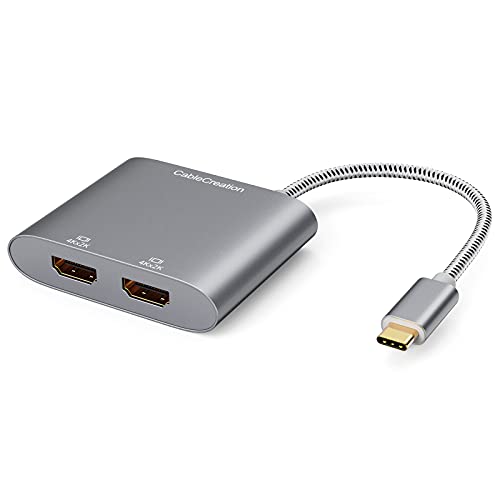
USB C to Dual HDMI 4K Adapter, CableCreation USB Type C (Compatible Thunderbolt 3) to 2 HDMI Adapter Compatible with MacBook Pro 2020/2019/2018/2017,XPS 13/Surface Book 2,Chromebook Pixel, Yoga 710
Product Description
USB C to Dual HDMI 4K Adapter, CableCreation USB Type C (Compatible Thunderbolt 3) to 2 HDMI Adapter Compatible with MacBook Pro 2020/2019/2018/2017,XPS 13/Surface Book 2,Chromebook Pixel, Yoga 710
- BEFORE PURCHASE NOTE: ❤️Make sure your laptop or PC supports ” Thunderbolt 3” or “display output mode(DP ALT mode)”. OTHERWISE it is NOT COMPATIBLE. If you don't know if your device is compatible with our products, send us a message via Amazon and we will help you
- How to set Dual display on MacBook: Please noted that MacBook is NOT able to run EXTEND MODE if you enable 2 or above extension display. ONLY MIRROR MODE is available if you connected 2 or above extension display on MacBook. Steps: Top left corner Apple icon-->System Preferences-->Displays--> Mirror or Extend Displays, both HDMI monitor are identical but different with laptop screen
- How to set Dual display on Windows: Both mirror and extend mode is available on Windows. Steps:Press Windows key + P combination command-->Choose Duplicate or Extend
- Plug & Play, Vivid 4K resolution: No driver or software needed. 2 extension display resolution is up to 4K@30Hz, please makre sure us HDMI 1.4 cable or above to avoid Screens flickering. If your source video or laptop is over 4K@30Hz. Please lower the resolution as :For Windows Menu--> Setting--> Display--> Advanced Display Settings, set your laptop's resolution same as or lower the resolution of external monitor. For MacOS: Left-upper Apple icon-->System Preferences-->Displays-->Mirror displays
- What You Get: We provide 24 months worry free warranty for this USB-C dual hdmiI convertor, please feel free to contact us if you have any question or suggestion, we will get back to you in 24 hours.
This adapter is built with the solution of [DisplayPort Alternate Mode]
USB-C to HDMI adapter is compatible with the following device:
*Macbook Air 2018
*iMac 2017 / iMac Pro 2017
*MacBook Pro 2017 & 2016
*MacBook 2016 & 2015
*New Chromebook Pixel
*Dell XPS 15 & 13 & 12
*HP Spectre x360 13 & 15 inch
*Asus Zen AIO All in One PC
*Surface Book 2
If your device is not in the list, please don't hesitate to contact us.
Important Notes:
1.Before purchase,please make sure your PC support "DisplayPort Alternate Mode".
2.â¤ï¸For MacOS system,it will NOT Support Extend Mode, two HDMI monitors will show the same image.As the third picture shows.â¤ï¸If you want to use extend mode on MacOS system, you can use Win10 system or you can consider product ASIN B07799WBKW (CD0502)& ASIN B019Q652AG (CD0101).Please be informed that CD0502 is ONLY compatible with Thunderbolt 3 laptop, it is also NOT compatible with MacBook12'' due to this laptop is USB-C Gen 1 NOT Thunderbolt.
3. In order to enjoy the 4K high resolution, please make sure to use HDMI 2.0 cable.
4.Supports resolution up to 4k@30Hz,but we recommend you to make sure your monitor/tv could supply corresponding output.
5. If the resolution of your laptop is higher than the external monitor.
For windows: Windows Menu--> Setting--> Display--> Advanced Display Settings, set your laptop's resolution same as or lower the resolution of external monitor.
For MacOS: Left-upper Apple icon-->System Preferences-->Displays-->Mirror displays. Then your HDMI monitor would mirror your Mac. However here you have two choices. One is "Optimize For" your built-in Retina Display, the other is "Optimize For" your HDMI monitor. You can choose which one you like.
6.For Windows system laptop, if the external monitor could not work, please update the BIOS and graphic card driver from laptop official website.
Technical Specifications
You might also like

USB-C to Dual HDMI Adapter 4K @60hz,Type C to HDMI Converter Compatible MacBook/MacBook Pro 2019/2018/2017,MacBook Air 2018,Samsung Galaxy S9/S9+/S8/S8+,Surface Book 2 and More USB C Device

VIVO Dual LCD Monitor Desk Mount Stand Heavy Duty Fully Adjustable fits 2 /Two Screens up to 27" (STAND-V002)

StarTech.com USB 3.0 to Dual HDMI Adapter - Windows Only - 4K Resolution - Dual Monitor External Video Card Adapter (USB32HD2)

USB C Docking Station 4K, Dual Monitor Dock Compatible with Thunderbolt 3 and USB Type-C MacBook/MacBook Pro, Windows laptop, Equipped with HDMI, Mini DisplayPort, LAN, 5 USB 3.0 Ports, SD Slot, Audio
USB C Hub,GIKERSY 8-in-1 USB C Docking Station with 2 HDMI 4K,3 USB-C Ports,2 USB 3.0 Ports,3.5mm Audio Jack,Compatible with MacBook Pro 2019/2018-2016

Tuwejia USB C to Dual HDMI 4K Adapter, Thounderbolt 3 to HDMI 1 in 2 Out Switch Splitter,USB 3.0 Hub and Quick Charge,Tpye C Digital av Adapter Compatible MacBook Pro/iPad Pro 2018/Macbook air 2018

Dell 27 LED backlit LCD Monitor SE2719H IPS Full HD 1080p 1920 x 1080 at 60 Hz HDMI VGA

USB-C to Dual HDMI Adapter 4K @60hz, TOPOINT Type C to HDMI Converter Compatible MacBook/MacBook Pro 2016/2017/2018, MacBook Air 2018 Samsung Galaxy S9/S9+/S8/S8+, Surface Book 2

Certified Cable Matters Thunderbolt 3 to Dual HDMI Adapter for Mac and Windows Supporting Dual 4K 60Hz (Not Compatible with USB-C Ports Without The Thunderbolt Logo)

BenQ PD3200U DesignVue 32 inch 4K IPS Monitor | Ergonomic for Professionals | AQCOLOR Technology for Accruate Reproduction (2019 New Firmware Updated)