

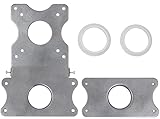
HumanCentric VESA Mount Adapter Compatible with Viewsonic Monitors VX2770SMH-LED, VX2370SMH-LED, and VX2270SMH-LED
Product Description
HumanCentric VESA Mount Adapter Compatible with Viewsonic Monitors VX2770SMH-LED, VX2370SMH-LED, and VX2270SMH-LED
- Compatible with Viewsonic monitors: This bracket is only tested and guaranteed to work with: Viewsonic VX2770SMH-LED, VX2370SMH-LED, and VX2270SMH-LED (Same as VX2770SMH, VX2370SMH, and VX2270SMH). Does not fit other brands or models.
- Requires a monitor arm with a high weight capacity: This adapter attaches to the bottom of the stand and causes the monitor to extend farther forward than a standard monitor. Ensure that your monitor arm can support 20+ lbs before using this adapter.
- Easy Installation - You’ll be able to install this bracket in less than two minutes with nothing more than a screwdriver! Just remove the existing base and snap ours in place instead - then connect it right to the VESA mount.
- Tame the cable monster - Our handy cable slot is the perfect way to keep your cables organized. Rather than having them hang out the back of the monitor, just slip them right through the slot and run them back along your mounting arm.
- Satisfation guaranteed - If you have any problems with your mount, send it right back to us - no questions asked. Our bracket is guaranteed to fit your monitor.
MOUNT THE UNMOUNTABLETM
Bought a Viewsonic monitor and disappointed that you can't VESA mount it? This bracket enables you to mount select Viewsonic monitors to a desk mount, articulating arm, or any other VESA mounting system.
Fits ONLY the following Viewsonic Monitors:
- VX2770SMH-LED
- VX2370SMH-LED
- VX2270SMH-LED
**DOES NOT FIT OTHER BRANDS OR MODELS. Check to make sure your monitor is listed before ordering! **
Fits Standard VESA Hole Patterns: 75 mm x 75 mm, 100 mm x 100 mm
The only tool required for installation is a screwdriver that fits the screws that came with your VESA mount.
A VESA mount can be used to save desk space or provide additional viewing flexibility by mounting the monitor on a stand, movable arm, multiple-monitor mount, or a wall mount.
Technical Specifications
You might also like

VIVO Dual LCD LED Monitor Desk Mount Stand Heavy Duty Fully Adjustable fits 2/Two Screens up to 27" (STAND-V002)
VIVO Adapter VESA Mount Kit / Bracket for Apple 21.5” and 27” iMac (Late 2009 to Current Models) LED Display Computer (STAND-MACB)
ViewSonic VX2270SMH-LED 22" IPS 1080p Frameless LED Monitor HDMI, DVI, VGA

AmazonBasics Premium Single Monitor Stand - Lift Engine Arm Mount, Aluminum

Mount-It! MI-789 Triple Monitor Stand Freestanding LCD Computer Screen Desk Mount for 19, 20, 22, 23, 24 Inch Monitors VESA 75 and 100 Compatible Full Motion, 66 lbs Capacity (3 Horizontal Monitor)

VESA Mount Adapter for HP Pavilion 27xw, 25xw, 24xw, 23xw, 22xw, 22cwa, 27cw, 25cw, 24cw, 23cw, and 22cw Monitors (Compare to CVB100 and L6V75AA) [Patent Pending] - by HumanCentric

ViewSonic VA2759-SMH 27" IPS 1080p HDMI Frameless LED Monitor

VIVO Dual LCD Monitor Free Standing Desk Mount with Optional Bolt-through Grommet / Stand Heavy Duty Fully Adjustable fits Two Screens up to 27" (STAND-V002F)
AmazonBasics Premium Dual Monitor Stand - Lift Engine Arm Mount, Aluminum

North Bayou Monitor Desk Mount Stand Full Motion Swivel Monitor Arm for 17''-27'' Computer Monitor from 4.4 to 14.3lbs