
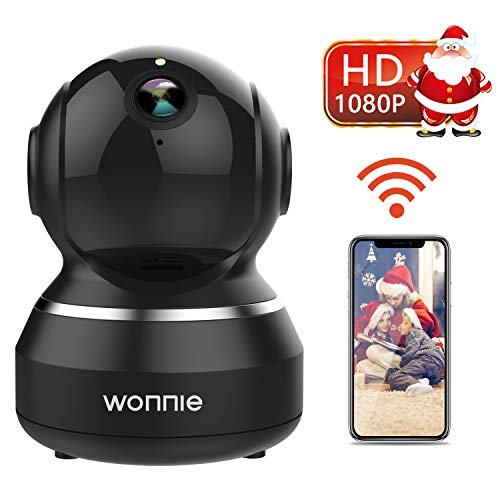
WONNIE Wireless IP Camera 1080P, WiFi Home Surveillance Security Camera for Baby/Elder/Pet/Nanny Monitor, Pan/Tilt, Two-Way Audio & Night Vision(Black)
Product Description
WONNIE Wireless IP Camera 1080P, WiFi Home Surveillance Security Camera for Baby/Elder/Pet/Nanny Monitor, Pan/Tilt, Two-Way Audio & Night Vision(Black)
- 【Full 1080P HD Video Camera】WONNIE full HD home camera with 1920*1080P resolution at 25fps,the living stream can be accessed via iOS/Android mobile Phone, Windows PC and Apple Mac Software.
- 【Smart Connection To WiFi 】Just support 2.4G wifi, not support 5G wifi. With the technology of "Sound Wave Smart Connection" you can finish the Wi-Fi configuration in just one click!
- 【120° Wide Angle & Free App】Camera has 360°pan and 345°tilt with 120°broad field of view, creating a complete 360° viewing angle. Just download iEye App, it is all free.
- 【Two-Way Talk】Keep tabs on your love ones even when you are thousands miles away. Compatible with Android/IOS smart phone. Built-in anti-noise filter for clear 2-way Audio experience.
- 【Activity Alerts】Motion Detection features use state-of-the-art technology to detect and send notifications to your phone. Activity Alerts available free of charge.
Features:
Full HD Video, Complete 360° Coverage, Reliable WiFi Connection, Two Way Talking, Smart Alarm, CLEAR NIGHT VISION, Micro SD Card Slot, no risk of personal Iinformation...
Specifications:
Video Quality: 1080p (1920*1080)
Viewing Angle: 112° wide-angle, 345° horizontal & 120° vertical rotation range.
Support Microphone: Yes, two-way Audio.
SD Card Slot: support most 128G SD Card (Not included in the package).
Night Vision: 23ft (Depends on the Environment).
Network Connection: Wereless and Cable Connection.
Mobile OS: iOS, Android.
PC OS: Windows7,8,10,XP, Mac OS.
Browser: Supports Google, Firefox, Safari etc.
User instruction:
Firstly, connect your mobile device to your WiFi and download the App "IEye" on the App Store or Google Play store.
*(Please note if you use dual band router, please make sure your phone connect to 2.4GHz WiFi, but not 5GHz one. )
1. Tap the icon "Add Camera"
2. Tap "Scan QRCode", and give your camera a name
3. Select connection mode (smart connection/network cable connection/hotspot connection) Enter the password of your WiFi router. Wait for around 60 seconds for the WiFi configuration and done.
You can view up to 4 cameras on the screen simultaneously when Eyeplus App supports many cameras linked together.
Package Include:
1 * WIFI IP Camera
1 * Power Adapter
1 * User Manual
2 * Screws
Warm Notes:
Your WIFI speed can affect your video play effects. The first time may have to wait for 10s - 60s.
ABOUT WONNIE:
Free return & exchange service within 60 days and free technical assistance. Our friendly and effective after-sale service will put your worries aside.
Technical Specifications
You might also like

IP Camera, TanTan 1080P HD Wireless Smart Dome Camera, Security Surveillance System with Motion Detection, Night Vision, 2-Way Audio, Motion Tracker, Remote Monitor for Home

Kingston Canvas Select 32GB microSDHC Class 10 microSD Memory Card UHS-I 80MB/s R Flash Memory Card with Adapter (SDCS/32GB)

FREDI Baby Monitor Wireless 1080P Security Camera, WiFi Home Surveillance IP Camera for Baby/Elder/ Pet/Nanny Monitor, Pan/Tilt, Two-Way Audio & Night Vision

Cordless Water Flosser, Beautlinks Water Mouth Flosser with 4 Jet Tips IPX7 Water proof Portable Rechargeable Water Jet Dental Irrigator Flosser

Wireless IP Camera, Zeetopin Wifi Home Security Surveillance Camera System 1080P HD For Baby/Elder/Pet/Nanny Monitor, Dome Cameras With Night Vision & 2 Way Audio for IOS/Android
WiFi Range Extender 300Mbps ICODE WiFi Booster/Wireless Repeater Extends WiFi to Smart Home & Alexa Devices.Easy Set Up (EX-300) (300Mbps)

Power Bank Portable Charger 24000mAh High Capacity Dual Flashlights with LCD Indicator,3 USB Output Ports, Battery Pack Compatible with Smartphone Tablet,Android & More

Sebikam Full HD Car Dash Cam, 1080p Front Rear 290 Degree Super Wide Dashboard Camera with 4 Inches Screen, G-Sensor, Parking Mode, Loop Recording, Night Mode
Mi Home Security Camera, Xiaomi HD 1080P 2.4G/5G Wireless IP Security Surveillance System for Baby Pet Indoor Monitor, Night Vision, Two Way Audio

Salking 48Ft LED Outdoor String Lights, Decorative Globe Commercial Waterproof String Lights with 16 x 2W S14 LED Bulbs, Connectable Lights for Patio Garden Wedding Party Christmas (Double Fuse)