
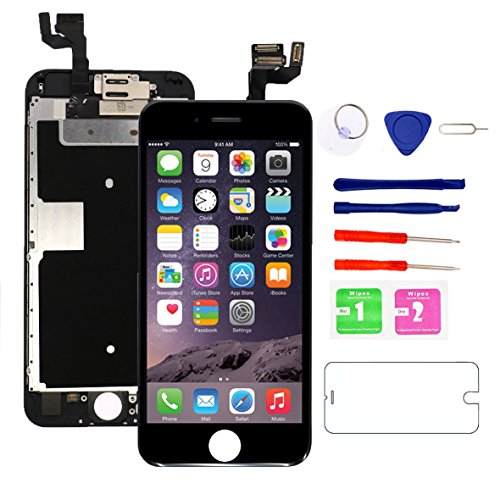
for iPhone 6S Screen Replacement (Black) with Front Camera, 3D Touch Screen Digitizer Frame for A1633, A1688, A1700 Full Assembly with Ear Speaker- Proximity Sensor-Repair Tool Kits-Screen Protector

Product Description
for iPhone 6S Screen Replacement (Black) with Front Camera, 3D Touch Screen Digitizer Frame for A1633, A1688, A1700 Full Assembly with Ear Speaker- Proximity Sensor-Repair Tool Kits-Screen Protector
Compatible: For iPhone 6S, 4.7 inch. For model A1633/1688/1700
Apply for: Screen replacement is used to repair and replace your wrong, cracked, damaged, faulty, shattered screen, also cure display problems, dead pixels, cracked screen, wrong color issues. We have all the product strictly tested before shipping. To offer the best service to our customers. If there is any question or problem, pls contact us via Amazon message for assist. We will stand by our customers and products.
ã€NOTE】 this screen replacement kit doesn't include the home button.  In order to retain Touch ID function (Fingerprint scanning), you have to transfer the original home button onto the new screen replacement, or you are unable to unlock your phone.Â
Package includes:
1. Full digitizer assembly for iPhone 6SÂ
(Pre-assembled LCD display touch screen, Front camera, Ear speaker, Light and Proximity sensors )
2. A set of Repair tools (include: 1 x Philips screwdriver,1 x 5 stars screwdriver, 2 x Pry Pick, 1 x Suction Cup, 1 x Dust Wipes,1 x Sim card pin )
3.Tempered glass screen protector for iPhone 6S (4.7").
âš Â Attention :
Please test the new LCD before you install.
1.Connect the cable
2.Test screen
3.Test Touch: Long press one of APP moving around the screen, to check the new screen could normal to work or not
Instruction:
1.Check the LCD to make sure the fles is in good condition and there us no debris on the connector.
2.Disconnect and reconnect the cable from the motherboard side.
3.Make sure for iPhone IOS is upgraded to the lastest version.
4.Leave the phone alone in a dry environment. Something dirt may caused some damage for the replacement.
Technical Specifications
You might also like

Carvesky High Capacity 2200 mAh Li-ion Battery for ip 6s Replacement with Complete Repair Tools Kits, Instruction and Screen Protector with 24 Month Warranty [Only for ip6s]

Johncase Home Button Flex Ribbon Cable Assembly w/Rubber Gasket Replacement Part Compatible iPhone 6s 4.7 / 6s Plus 5.5 (Black)
HTECHY Compatible with iPhone 7 Screen Replacement White(4.7") - Replacement for iPhone 7 Digitizer LCD Touch Screen Display Assembly with Complete Repair Tools Kit and Screen Protector