
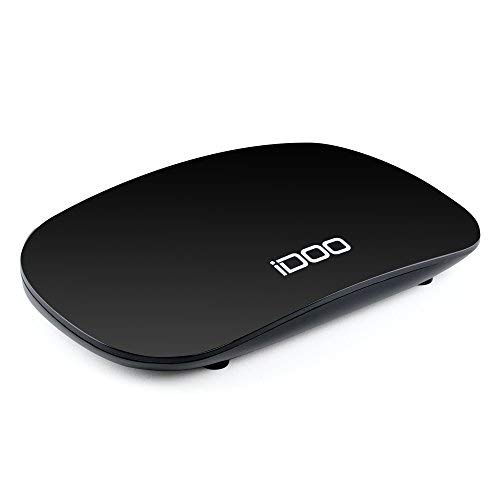
iDOO Set Top Box TV Box Converter Box, TV Converter Box for Analog TV with HDMI Out Coaxial Out AV Output Composite Out USB Input Recording 1080p Remote Control and Game Playing Function
Product Description
iDOO Set Top Box TV Box Converter Box, TV Converter Box for Analog TV with HDMI Out Coaxial Out AV Output Composite Out USB Input Recording 1080p Remote Control and Game Playing Function
- Free Local TV Channel: Set top box receives over-the-air ATSC digital TV broadcast to your analog TV.
- HD 1080P Output: Watch and record free to air television in full HD quality, 1080P/ 1080i/ 576i/ 576P/ 720P with the TV box.
- Multiple Output / Input Methods: The converter box has HDMI out/ coaxial out/ AV output/ USB Input to support multiple connection methods.
- Other Functions: The analog TV converter box has TV recording / remote control/ parental lock/ auto search/ timer setting/ USB upgrade function.
- What You Get: 1 x Digital TV Converter Box, 1 x Remote Control, 1 x AV Cable, 1 x AC/DC Adapter, 2x AAA Battery, 1 x User Manual (antenna is not included). Local U.S. Customer Service after-sales team. 1 year warranty.
iDOO digital converter box for analog tv, converts over-the-air (OTA) digital broadcasts received from TV antenna to play on your analog TV.
Offering several benefits, including higher picture quality and sound our TV converter box features a higher number of channel choices and additional function such as real-time and programmed time recording,parent control,etc.
Features:
1.External USB Port for you to play your own musics, movies or pictures;
2.Support timer recording your favorite live programming;
3.HDMI port or hook up through the coaxial port(must ANT-IN)
Specifications
-Tuner
Input Frequency: 57MHz~861MHz
RF Input Level: -78~-20dBm
RF Bandwidth: 6MHz
Modulation: 8VSB,64QAM,256QAM
-Video
Decoder Format: MPEG4 AVC/H.264 HP@L4 MPEG2 [email protected]
Output Format: 480i/480p/576i/576p/720p/1080i/1080p
Output Port: HDMI, CVBS(RCA)
-USB2.0?
Supported Capacity: 500GB
Supported Media: MP3,JPEG,BMP,AVI,MKV?
Note:
1. How to switch channels: over-the-air digital channels now have sub-channels, so 4 is now 4-1. So if you want to jump to channel 4, this converter box requires this sequence
of presses on the remote: "4", "- "(button next to number 6 on remote), "1", OK.
2.Remote Controller Problem: When remote controller working with weak signal, please try
following steps: a. Replace a pair of new battery; b. Best operation distance: 3-5M no obstacles away from indicator light of TV box; c.Direction Range: 45 degrees deviate off indicator
light from left or right.
3.Black screen with ¡°BAD SIGNAL¡±: please ask iDOO for upgrade firmware. It would work well after upgrading.
4.No Channels: Please ask iDOO for upgrade firmware. Set ¡°signal type¡± to ¡°CABLE¡± after upgrading.
Technical Specifications
You might also like

HDMI to Coax RF Converter Modulator for TV - HDMI in Coaxial Out Convertor Adapter Box with Remote Control RF Analog Signal Transmitter Adaptor with Zoom Function for Old TV Support 1080P Input
Mediasonic ATSC Digital Converter Box with Recording / Media Player / TV Tuner Function (HW130STB)

2019 Upgraded】 HDTV Antenna Indoor Digital TV Antenna, 120 Miles Range HD Antenna with Amplifier Signal Booster and 13FT Coaxial Cable - Extremely High Reception
RCA Compact RF Modulator (CRF907A)

Updated 2019 Version Professional 75-150 Miles TV Antenna, Indoor TV Digital HD Antenna 4K HD Freeview Life Local Channels All Type Television
TV Antenna Indoor Digital HDTV Freeview 4K HD VHF UHF for Local Channels 130 Miles with Signal Amplifier for All Television 16.4 ft Cable

BOOBRIE F-Type RF Coaxial Connectors RG6 Adapter F Female to F Female, Antenna Connector Extension Cable Adapter for TV Antenna, Nickel Plated Pack of 2

Parts Express Cable TV in-Line Coaxial Surge Protector
Updated 2019 Version Professional Carbon Fibre 65-120 Miles TV Antenna, Indoor TV Digital HD Antenna 4K HD Freeview Life Local Channels All Type Television Switch Amplifier Signal Booster