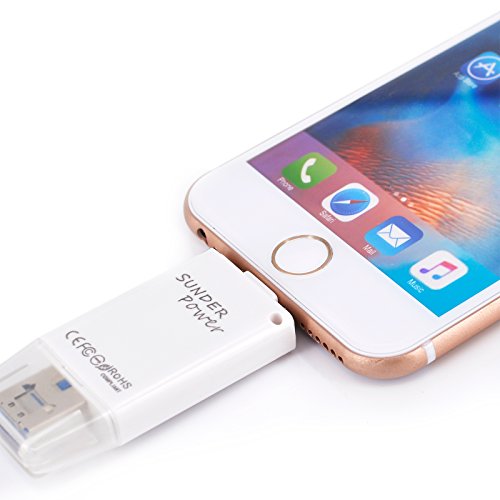
NEW USB i-Flash Drive 32GB Flash Memory for iPad iPhone 5S 5 C 6 6Plus 6S 6S Plus (32GB)

Product Description
NEW USB i-Flash Drive 32GB Flash Memory for iPad iPhone 5S 5 C 6 6Plus 6S 6S Plus (32GB)
- Compatible With IOS 9 ,With built-in storage of 32GB, it can dual storage image & video between Devices and Mac/PC
- Free APP:AGP File/i-FlashDevice from App store for communication between you iDeivice and AGP File .
- The standard USB is compatible with all USB based computers, and at the other end it works with iPod touch, iPhone and iPad
- Compatibility with:iPhone8 8P/iPhone7 7P/iPhone 5C;iPad4/iPad Air/iPad Mini/iPad Mini2;iPad Touch5/iPhone6/iPhone6S/iPad6
- Document viewer,Picture viewer, Watch movies very smooth fast cache on you AGP File/i-FlashDevice .
Free App from APP Store for communication between your Devices and AGP File/i-FlashDevice management, music play and contact backup are fully built-in Features: Build-in capacity of 32GB External memory expansion for iPad iPhone iPod Touch Secured file Encryption for private files Manage all your Date directly on the iOS-Device(create, copy, move, delete, rename, open in and many more) Playback Videos/Music directly from external memory Backup and restore your contact list Document viewer for all major file formats Voice Recorder/Text Editor Dropbox support The standard USB is compatible with all USB based computers, and at the other end it works with iPod touch, iPhone and iPad Color: White Weight: 31g Item Dimension: 5.5 x 0.8 x 2.6 cm How to use this item: Step one: install the AGP File/i-FlashDevice from App Store; Step two: insert the 8 pin dock of AGP File/i-FlashDevice into Apple device; Step three: Run the AGP File Noted: 1.The first time you use the flash drive, you'll get a hint information to install the "AGP File/i-FlashDevice " from Apple APP Store. If you ignore the installation the first time, then you'll need to download the "AGP File/i-FlashDevice " from Apple APP Store manually. 2.To ensure the best connection, please remove your phone case if it is up to 1.5mm. 3.APP instructions are embedded in the"AGP File/i-FlashDevice ". Open the software - click the "Settings" icon ---- Instructions.